

A cabling quote is shaped by the route as much as the cable. Yes, data cabling installation in Melbourne can extend to a granny flat, garage or studio, with the distance, access and path between buildings affecting the work involved. The price depends on the case and is given after a quote request, with factors including cable type, outlet locations and installation complexity.
It’s understandable to want a clear idea of costs before choosing a setup. This guide explains what can affect a quote, how Cat6, Cat6a and fibre differ, and what to consider when connecting a separate building. You’ll also see how the intended use, cable route and network requirements help determine a practical option for your home or business.
Key Takeaways
- Cabling can connect a granny flat, garage or studio; the route, distance and access between buildings help shape the installation.
- Compare Cat6, Cat6a and fibre against the distance and network performance your home or business needs.
- Make a quote more useful by identifying outlet locations, cable paths and any access challenges before planning the work.
- After a data cabling job, the Australian Communications and Media Authority says cablers must provide a Telecommunications Cabling Advice form.
Hardwired home and business network connectivity
In Victoria, cabling installation and termination requires a registered approved cabler. Phone, internet and Cat 6 data cabling work may be subject to applicable licensing requirements.
Plan each connection around the equipment, cable route and network cabinet. After a data cabling job, cablers must provide a Telecommunications Cabling Advice form, as required by the Australian Communications and Media Authority.
Wired connections for fixed devices
A wired connection is useful for equipment that stays in one place, such as a desktop computer, television or printer. The data cable connects each device to the network infrastructure, so that connection does not rely on Wi-Fi.
List fixed devices first, then mark their locations and the route back to the router or cabinet. For example, a home office computer and a living-room television may need separate outlets. This gives the installer a clear plan for data cabling installation and helps prevent outlets being placed in the wrong spots.
Network cabinet upgrades and cable management
A network cabinet brings the router, switch and incoming data cables together in one place. During an upgrade, organise cables by destination and label each connection, such as “office” or “meeting room”. Clear routing makes future fault-finding more straightforward.
Check that the cabinet layout can accommodate the equipment and new cable runs. In a small office, keeping labelled connections separate from loose or unused cables makes ports easier to identify during maintenance.
For IT field support, troubleshoot in a consistent order: identify the affected device, inspect its cable and outlet, then trace the connection towards the cabinet. If a desktop loses network access, for instance, testing it at another known-working outlet can help narrow down the fault. This can distinguish a local device issue from a cabling or network-path problem.
Government and event network installations need a plan for equipment locations and cable routes. For a council meeting in a hired venue, identify where presentation equipment, staff computers and registration desks will go before routing cables. This keeps fixed-device connections accessible and reduces ad hoc cabling across work areas. Specify each endpoint and label it at the cabinet to support event setup and later network troubleshooting.
Looking For Expert Data Cabling Technicians?
Residential and commercial installations connect internet, telephone and voice equipment to suit each property’s layout. A practical plan identifies the endpoints, cable routes and network equipment each connection must serve.
Residential and commercial cabling
Residential cabling can connect a study computer, television or access point, while commercial infrastructure may serve workstations, printers and shared equipment. Start by listing each device and its location, then map the route to the network connection. This helps define the project scope across Melbourne, whether you’re planning a home office or a growing workplace.
Commercial data, telephone and voice cabling
Commercial data, telephone and voice cabling can support different communication needs in one workplace. For example, a reception desk may need a computer connection and a telephone point, while meeting rooms may need data connections for fixed equipment. Identify each use before installation, including where staff work and where shared devices are located. This gives the cabler a practical layout to follow.
Applicable standards and regulations
In Victoria, cabling installation and termination requires a registered approved cabler. For phone, internet and Cat 6 data cabling, check which qualifications apply before work begins. The Australian Communications and Media Authority requires cablers to provide a Telecommunications Cabling Advice form after each data cabling job. These requirements apply to residential and commercial work, so include the form and the cabler’s registration in your installation plan.
Risks of DIY or poor installation
DIY or poorly installed cabling can leave a connection unreliable or unable to serve its intended device. A badly planned route may also make later fault-finding harder, especially when several office endpoints meet at one cabinet. Avoid guesswork: define the equipment and destinations first, and have cabling work performed by an appropriately registered cabler. This helps reduce avoidable rework and disruption to internet or voice access.
For planned home or workplace connectivity, explore data and TV installations as part of your wiring requirements.
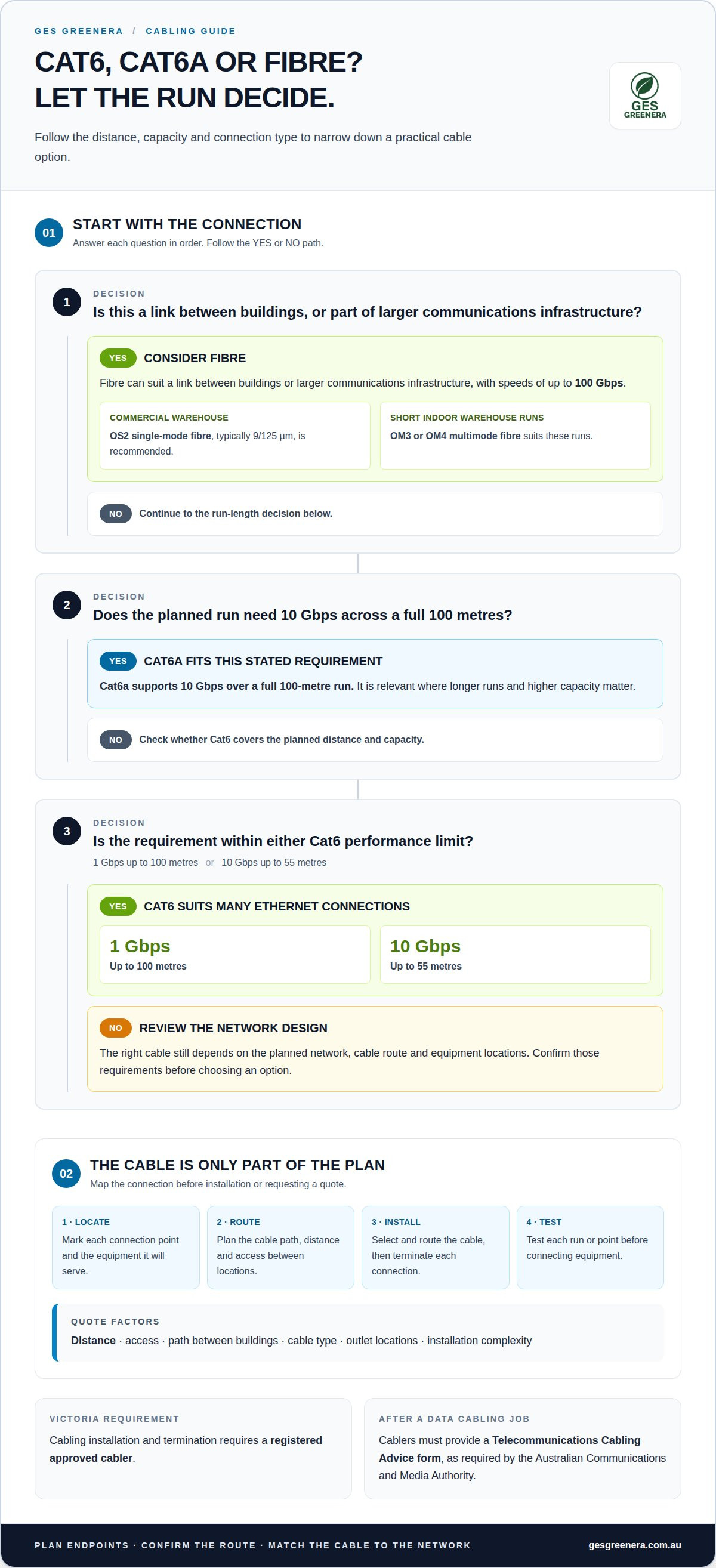
Cat6 vs Cat6a vs Fibre: Which Cable Do You Need?
For a home or office, consider the cable run, network requirements and equipment locations when planning connections. A typical installation involves mapping connection points, selecting and routing the cable, terminating it, then testing each run.
Cat6 suits many Ethernet connections. It supports 1 Gbps up to 100 metres, or 10 Gbps up to 55 metres. Cat6a supports 10 Gbps over a full 100-metre run, making it relevant where longer runs and higher capacity matter. These figures help compare cable options, but the right choice still depends on the planned network and cable route.
Fibre optic cabling can provide speeds of up to 100 Gbps. It can suit a link between buildings or larger communications infrastructure, where the design calls for a fibre connection. For commercial warehouse setups, OS2 single-mode fibre, typically 9/125 µm, is recommended. OM3 or OM4 multimode fibre suits short indoor warehouse runs.
Fibre work involves planning the route, installing and terminating the cable, then testing the finished link. Where fibre sections need joining, splicing connects the strands; testing and fault-finding can help locate breaks or connection problems. A practical sequence is to map endpoints, choose the route, install and terminate the cables, then test each point before connecting equipment.
Copper, fibre and coaxial cables serve different network and communications requirements. Cat6 and Cat6a are copper Ethernet options; fibre is suited to links designed around fibre equipment. Coaxial cable can serve television connections, so identify whether each outlet carries network data, television signals or both before planning routes.
For a home office, Cat6 may meet the needs of standard network devices, while a warehouse link may call for fibre. Compare run distance and required performance first, then match the cable and termination to each connection point. That approach keeps structured cabling choices focused on the actual use, rather than selecting a cable by name alone.
Data cabling installation costs and quote factors
The price depends on the case and is given after a quote request. For Melbourne homes and businesses, the main cost drivers are the cable type, route, access, outlet locations and installation complexity.
A short, accessible run through an existing pathway differs from cabling that must cross a building or reach a detached garage. Consider how the cable can travel, where it must terminate and whether the route is practical. A granny flat connection, for example, requires a different route from an outlet beside a home router.
Scope also matters. A residential job connecting a study and television differs from commercial cabling across several work areas. More endpoints mean more cable runs and termination points to plan. Cat6, Cat6a and fibre also have different applications, so the intended network performance and run distance influence the design.
Access can affect the work involved. A clear route through an accessible space is simpler to plan than one through finished walls or a restricted area. Existing electrical infrastructure and the location of network equipment can also shape the cable path. Wireless coverage may suit some devices, while fixed equipment may benefit from a dedicated wired connection.
The time required for an installation depends on the number of cable runs, route access, termination requirements and testing. A small job with a straightforward path differs from a multi-room commercial installation, so the scope determines the work sequence and time involved.
To make your project brief useful, prepare a simple list of devices and outlet locations. Note whether the work is residential or commercial, identify any separate building and describe visible access restrictions. These details help clarify the cabling required and the likely route before work begins.
For electrical work that includes network or television cabling, request a data cabling quote with your proposed locations and requirements.
GES Greenera: Residential Electrical Repairs
GES Greenera provides electrical services for homes and workplaces, including data and TV installations. The team can help when you’re planning wired connections alongside other electrical work, or when you need a residential electrical repair.
For a broader project, GES Greenera also provides commercial switchboard upgrades, solar PV system installation and EV charging station installation. Each service addresses a different requirement. For example, a switchboard upgrade relates to commercial electrical infrastructure, while an EV charger installation supports home or business charging.
Clear details make it easier to discuss your project. Note the property type, rooms or devices involved, and whether the work relates to cabling, repairs or another electrical project. Contact GES Greenera to discuss the work you have in mind and request a free, no-obligation quotation.
Plan a network that can grow with you
Plan beyond the devices you use today. A home office may become a shared workspace, or a business may add equipment in another room. Mapping likely future connection points now can help your cabling plan accommodate those changes and reduce unnecessary rework.
For data cabling installation in Melbourne, prepare a clear brief: note the rooms involved, equipment to connect and any planned changes to the property. This gives the conversation a practical starting point and helps align the network layout with how you’ll use the space.
GES Greenera also provides residential electrical repairs, commercial switchboard upgrades and solar PV system installation. If your cabling project sits alongside other electrical work, discuss how the requirements fit together when planning the job.
Talk with GES Greenera about your network plans and take the next step towards a setup that suits your space.
Frequently Asked Questions
Can you run cabling to a granny flat, garage or studio?
Yes, a wired connection can serve a granny flat, garage or studio. Before planning, note how the space is used and which devices need a network connection. A studio used for work may need reliable access for a computer and video calls, while a garage may need a connection for just one fixed device. This helps define a setup suited to the space.
Do you provide certification after the job?
Cabling work includes handover documentation for your records. Keep the paperwork with your property plans, and note which rooms or equipment correspond to each outlet. If you later renovate, move network equipment or need to trace a connection, these records can help identify the installed cabling. Include the documents in the job handover, then store them somewhere easy to find.
Looking for a reliable communications technician in Melbourne?
GES Greenera provides data and TV installations for residential and commercial electrical projects. For data cabling installation in Melbourne, share the property type and the purpose of each connection. GES Greenera serves areas including Altona and Werribee. A clear description of your planned setup helps communicate the work required, whether you’re connecting a home workspace or adding network points in a business.
How much does data cabling installation cost in Melbourne?
There is no single price for every project. GES Greenera provides free, no-obligation quotations based on the work involved. Describe whether you’re adding new outlets, extending a network or addressing an existing connection problem. Include the rooms involved and the type of property so the quotation reflects the actual scope.
What factors affect the cost of data cabling in Melbourne homes and businesses?
The work required is a key consideration. Adding a new outlet differs from tracing an intermittent connection, which may require fault-finding before repairs. For a business, explain whether the work affects one area or several parts of the premises. For a home, identify which rooms need new connections. These details help clarify the project scope for a tailored, free quotation.
Which data cable should I choose: Cat6, Cat6A or fibre optic?
Choose a cable that suits the equipment and the connection you’re planning. Cat6 or Cat6A may suit Ethernet devices within a home or office, while fibre can suit a link between buildings or a larger network design. Before choosing, list the devices and check what connections the network equipment supports. This helps align the cable choice with your setup and future plans.


